Reports
Currently the only report available in Exchange is the Trading
Partners report, which displays information on all companies from
whom you receive files.
To run the report, from the Exchange home page, click the Exchange Menu button in the top
right corner and select Reports.
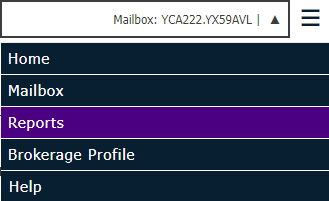
You may choose to export the data from either ECS
Partners to CSV format by selecting CSV
from the Export  drop down menu.
To narrow the results,
type a portion of the content of any of the columns in the Find
In ESC Partners: field. The list refreshes automatically as you
type.
To sort by any of the
columns present, click the column header. To sort in the reverse order,
click the column header again. The header of the column currently
used as a sort displays in italics with an upward arrow if sorted in ascending
order and a downward arrow if sorted in descending order.
Data in the ECS Partners list
displays in the following columns:
- Company Name: Name
of insurer.
- Set Name: Name of the insurer
that owns the Lead Mailbox.
- Lead Mailbox: Mailbox that
initiated the trading partnership.
- Partner Status: Can be
any of the following:
- Confirmed: You
are currently able to receive files from this mailbox.
- New: You have
not connected to Transfer Manager since the partnership was added,
and registration is not fully processed.
- Nominated: You
will be added as a partner during the next registration cycle.
- Sent: Partner
configuration files generated by registration have been sent to
you and are awaiting acknowledgement of receipt.
- Waiting: You
have not logged in to ECS recently or do not yet have an ECS mailbox.
- Pending: You
are a candidate to be added as a trading partner (must first be
given a status of Nominated).
- Pending Delete: This
partnership will be deleted during the next registration cycle.
- State: Always displays
as A (Active).
- Direction: Indicates how
information is being sent for this trading partnership.
- Send Only: The Lead Mailbox can send data
to you, but you cannot send data to the Lead Mailbox.
- Send & Receive:
The Lead Mailbox can
send data to you and you can send data to the Lead Mailbox (rarely
used).